July 2026
New Features
Section titled “New Features”Redesigned Home Dashboard
Section titled “Redesigned Home Dashboard”The Home page is now a live command center for your organization’s security posture, built around a date range selector, four module summary cards, and a pair of interactive flow charts. See the Home Dashboard guide for a full tour.
- Date Range Selector. Choose 7d, 30d, 90d, or 1Y to set the reporting window for the entire page. Counts update to reflect exactly what happened in that window, and key metrics show a period-over-period change indicator comparing the window to the one immediately before it — so you can tell at a glance whether things are trending up or down, not just where they stand today.
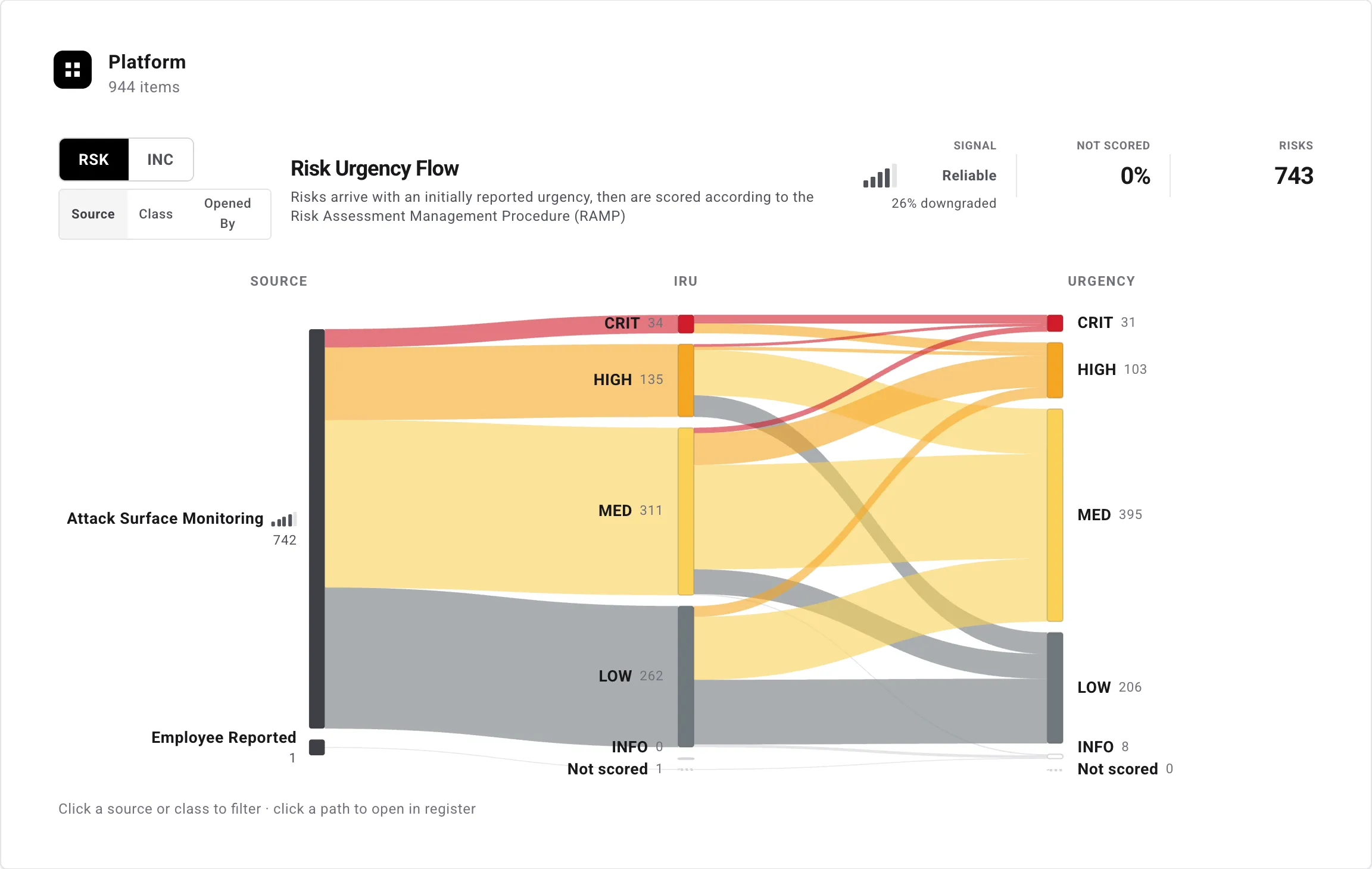
- Summary Cards for every module. Threats, Risks, Incidents, and Compliance each get their own card surfacing the numbers that matter most: the Threats card highlights which threat objectives are most strongly correlated with recent activity; Risks tracks Opened, Closed, and Remediation vs. SLA with a trend chart of remediations inside and outside SLA against your target; Incidents tracks Opened, Contained, an Open-by-Severity timeline you can filter by SEV-1 through SEV-5, and MTTR; and Compliance shows the current status of every governance document at a glance. Every card heading links straight into its module, so a number is never more than a click away from the records behind it.
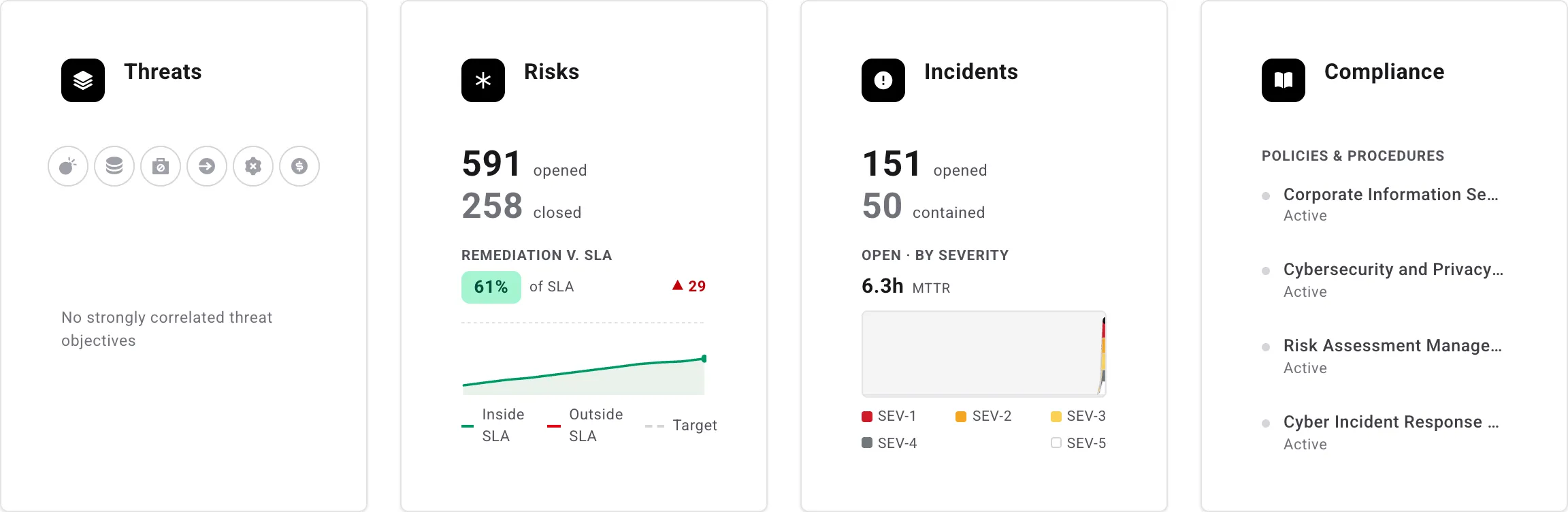
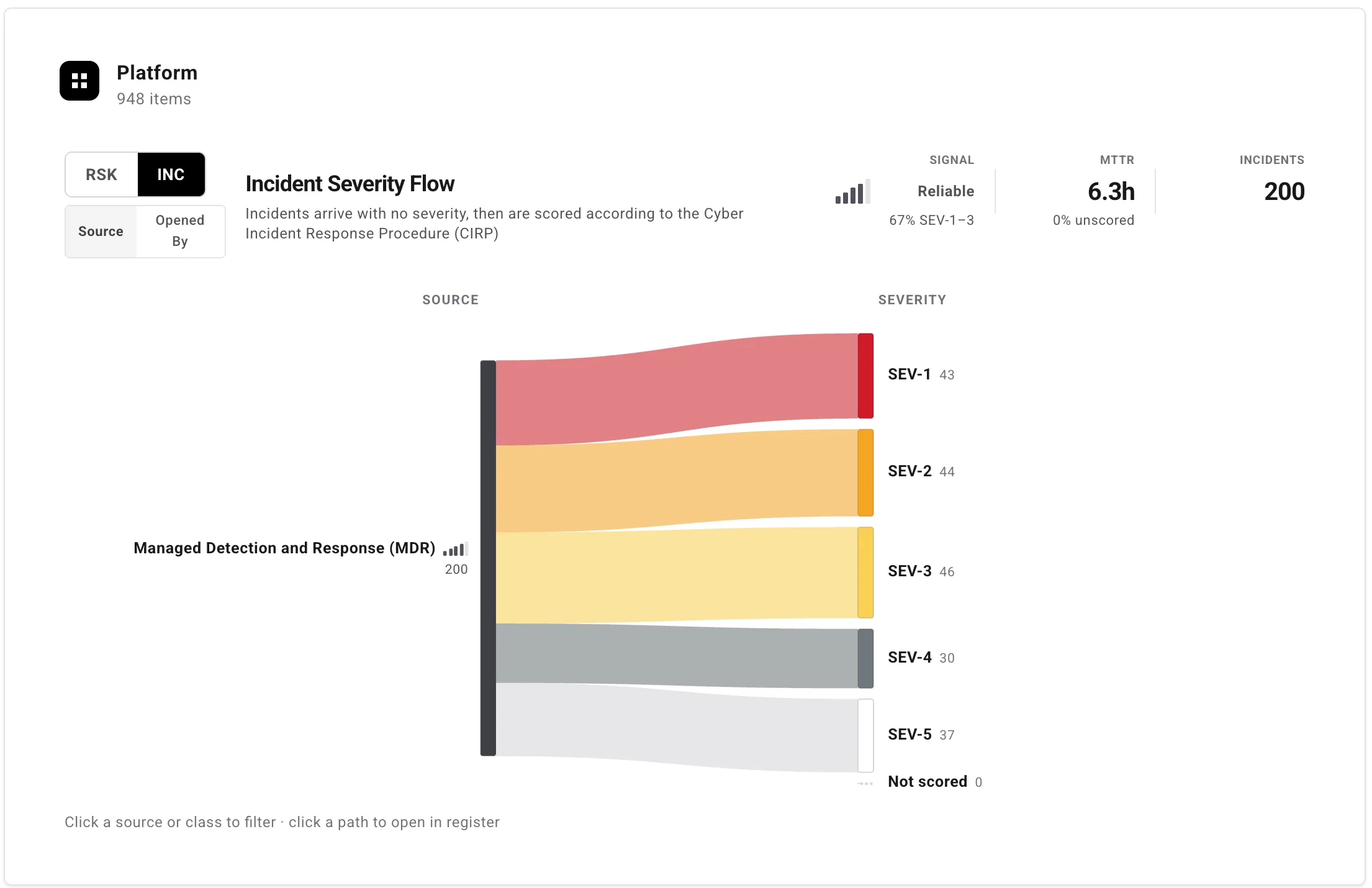
- Platform Flow charts. A new Platform section visualizes how risks and incidents move from intake to their final rating. Toggle between the Risk Urgency Flow (Source → Initially Reported Urgency → current Urgency) and the Incident Severity Flow (Source → assigned Severity), and group either one by Source, Class, or Opened By. Hover any band to trace its path through the chart, or click to pin the highlight. Summary tiles above each chart surface a signal-quality gauge — how much intake ratings shift once records are actually scored — alongside the share of records still awaiting a score.
- Every metric across the new dashboard explains itself instantly on hover, and the Risks and Incidents cards’ Opened counts — along with the register link behind them — are accurately scoped to whichever date range you have selected.
Centered Work Item Editor (Early Adopter)
Section titled “Centered Work Item Editor (Early Adopter)”A new centered editor for risks and incidents is available as an opt-in preview. Enable it from Settings > Preferences, under the new Early Adopter section, which includes a preview image of the new layout. The centered editor consolidates fields, associations, activity, comments, and tickets into a single modal, supports the same keyboard shortcuts as the classic editor (Cmd/Ctrl+Enter to save and advance to the next record), and adds previous/next navigation between records.
The classic side-panel editor remains the default and stays fully available — switching back is a single toggle.
@-Mentions in Comments
Section titled “@-Mentions in Comments”You can now @-mention teammates in comments on risks and incidents. Type @ in a comment to open a picker of people who have access to the record, select someone to insert a mention, and they’ll receive a notification linking back to the item (in-app, email, or both, depending on their notification preferences). Mentions render as inline links in the comment thread, and hovering one shows the mentioned person’s email.
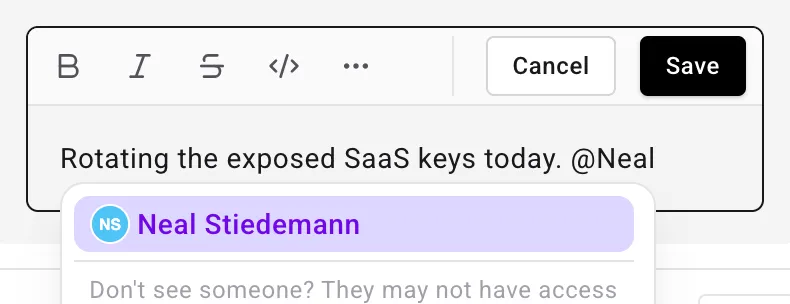
Because the picker only lists people who can already see the record, a mention can never expose a risk or incident to someone who wasn’t permitted to read it.
Dynamic Assigned To
Section titled “Dynamic Assigned To”Records imported from integrations can now arrive pre-assigned. When a connected source shows who a finding is assigned to — on GreyMatter incidents and on Wiz, BugCrowd, and HackerOne risks — Adversarial matches that person to a member of your organization by email address and sets them in the Assigned To field, so ownership carries over from the source tool without a manual triage pass.
Assignment is deliberately conservative:
- A record is only assigned when the source assignee’s email matches an active member of your organization. If no member matches — or the record is unassigned in the source — it is imported unassigned, exactly as before.
- On re-sync, the source assignee only fills in an empty Assigned To field. An assignee set in Adversarial is never overridden or cleared by a sync, so reassigning a record on the platform sticks even when the source assignee differs.
See the GreyMatter, Wiz, BugCrowd, and HackerOne guides for how each source’s assignee is matched.
Deferred Organization Creation
Section titled “Deferred Organization Creation”New users signing in for the first time without an invite no longer have an organization created for them automatically. Instead, they land on a Create your organization screen where they name their organization and become its admin. If you end up as the sole member of an organization you created by mistake, you can now leave it from your profile page — leaving is no longer limited to organizations with other active members.
Compliance Module Redesign
Section titled “Compliance Module Redesign”The Compliance module has a refreshed look across both its landing page and document viewer.
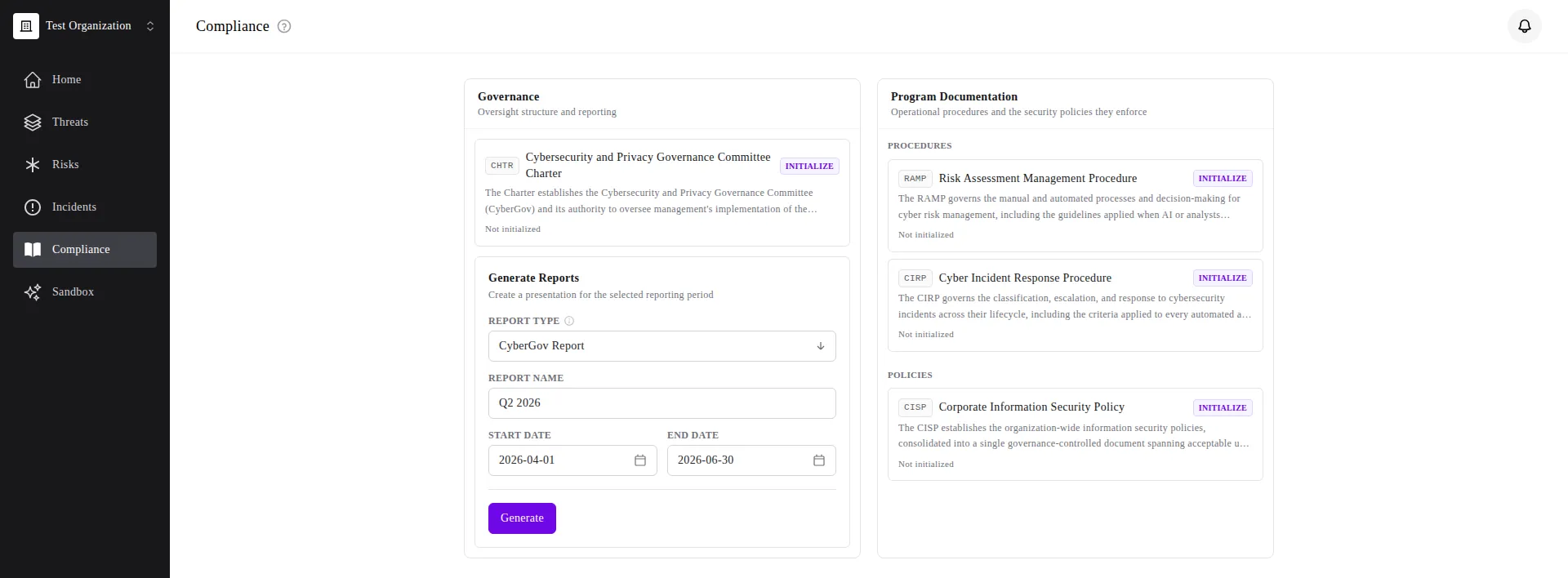
- The landing page now groups your documents automatically: Governance for oversight structure and reporting, and Program Documentation split into Procedures and Policies. Each document card carries a short code (CHTR, RAMP, CIRP, CISP), a one-line summary, and its current state — including who last approved or modified it once the document has been initialized. See Compliance for details.
- A dedicated Generate Reports panel sits alongside the documents: pick a Report Type (Board Deck or CyberGov Report), name the report, set the reporting period, and generate it — no more hunting for the deck download.
- Opening an individual document (RAMP, CIRP, CyberGov Charter, Cybersecurity Policy) now opens it as a full page in the layout rather than a fullscreen modal, with a single centered column, inline approval sliders, and a sticky Save action that surfaces a banner when a proposal is pending review.
Show Child Risks in the Remediation Agility Chart
Section titled “Show Child Risks in the Remediation Agility Chart”The Remediation Agility (RemAgi) chart’s Chart options menu now includes a Show Child Risks toggle, off by default. Turning it on folds linked child risks into the chart alongside their parents, rather than plotting parent risks only. See Remediation Agility for more on the chart.
Sortable Tags Column
Section titled “Sortable Tags Column”The Tags column on the risk and incident registers is now sortable — click the column header to order records by number of tags applied.
Shared Filter Views Within Your Organization
Section titled “Shared Filter Views Within Your Organization”Saved filter views can now be shared with your entire organization, not just a single link recipient. Mark a view as shared and copy its link — any member of your organization can open it, see the same filtered results, and save their own copy. A view shared from one of your organizations is only accessible within that organization, even if you belong to others.
New Record Indicator on Registers
Section titled “New Record Indicator on Registers”Clicking Add Risk or Add Incident now scrolls the register to the top and highlights the newly created record, making it easy to find in a large register.
Improvements
Section titled “Improvements”HackerOne: Remediation Guidance Mapped to Remediation Task
Section titled “HackerOne: Remediation Guidance Mapped to Remediation Task”Risks imported from HackerOne now populate the Remediation Task field automatically from any remediation guidance left on the HackerOne report, on both import and re-sync. See the HackerOne integration guide.
BugCrowd: Complete Submission Paging
Section titled “BugCrowd: Complete Submission Paging”Programs with a large number of submissions could previously have some submissions skipped during sync. Paging through submissions is now exact, and previously missed submissions are picked up by a full re-sync. See the BugCrowd integration guide.
Updated CSV Import Templates
Section titled “Updated CSV Import Templates”The downloadable CSV import templates for risks and incidents have been cleaned up. The risk template now includes a Remediation Task column and leaves Likelihood, Impact, and Urgency blank with a hint that a blank value is assigned Not Scored. The incident template drops fixed sample severities and clarifies that a blank Source is assigned Employee Reported on import. See Risk Fields and Incident Fields.
Portfolio View Enhancements
Section titled “Portfolio View Enhancements”The multi-org Portfolio page now sources its per-org Risk SLA and Incident backlog trends from live data for every organization row, rather than only the organization currently in view. It also gains new Compliance and Threat Objectives summary cards per organization, and the top bar now shows the notification bell.
Consistent “No Value” Labels in Filters
Section titled “Consistent “No Value” Labels in Filters”Filters on the risk and incident registers now use consistent labels for unset values: score fields (Urgency, Likelihood, Impact, Severity, IRU) show Not Scored, person fields (Assignee, Opened By, Updated By) show Unassigned, and date fields show None — across the register cell, filter editor, and filter summary pill.
Register and Modal Fixes
Section titled “Register and Modal Fixes”- The Show Child Risks / Show Child Incidents quick filter is no longer reset to off when the register reloads from a URL, so it now survives a page refresh, bookmarked link, or shared link.
- Linked risk and incident chips shown on a record now open in a new tab as clickable links, rather than being unclickable.
- Changing pages on the risk and incident registers now scrolls the table back to the top.
- The filter picker’s field order now matches the register’s column order.
- Detail modals for risks and incidents open faster by reusing data already loaded by the register instead of re-fetching it.
Tag Deletion Safeguards
Section titled “Tag Deletion Safeguards”Deleting a tag that’s still assigned to risks or incidents now warns you with the number of affected records instead of silently removing the tag from them. Confirm again to delete and strip the tag from those records, or reassign them to a different tag first.
Settings Reorganization
Section titled “Settings Reorganization”- Tags management has moved from the personal settings menu into the organization section, under Notifications.
- A new Portfolio item in your personal settings hosts Portfolio Tags, previously part of the Tags page.
- The Incidents settings page now has a Sources section, alongside filter views, for managing incident sources — mirroring the existing Risk Sources page.