Wiz
Overview
Section titled “Overview”Integrate your Risk Register with Wiz. Each Wiz issue is imported as its own risk record.
- Source: Attack Surface Monitoring
- Type: Configuration
- Opened By: The integration user for the connection, named for the product and the connection — for example “Wiz Production”. See Integration users.
The integration can be enabled directly from your Adversarial tenant via Settings > Integrations. The necessary details to connect your Wiz environment are the URL (your Wiz API endpoint — an https address on wiz.io), plus the Client ID and Client Secret from a service account scoped to read issues.
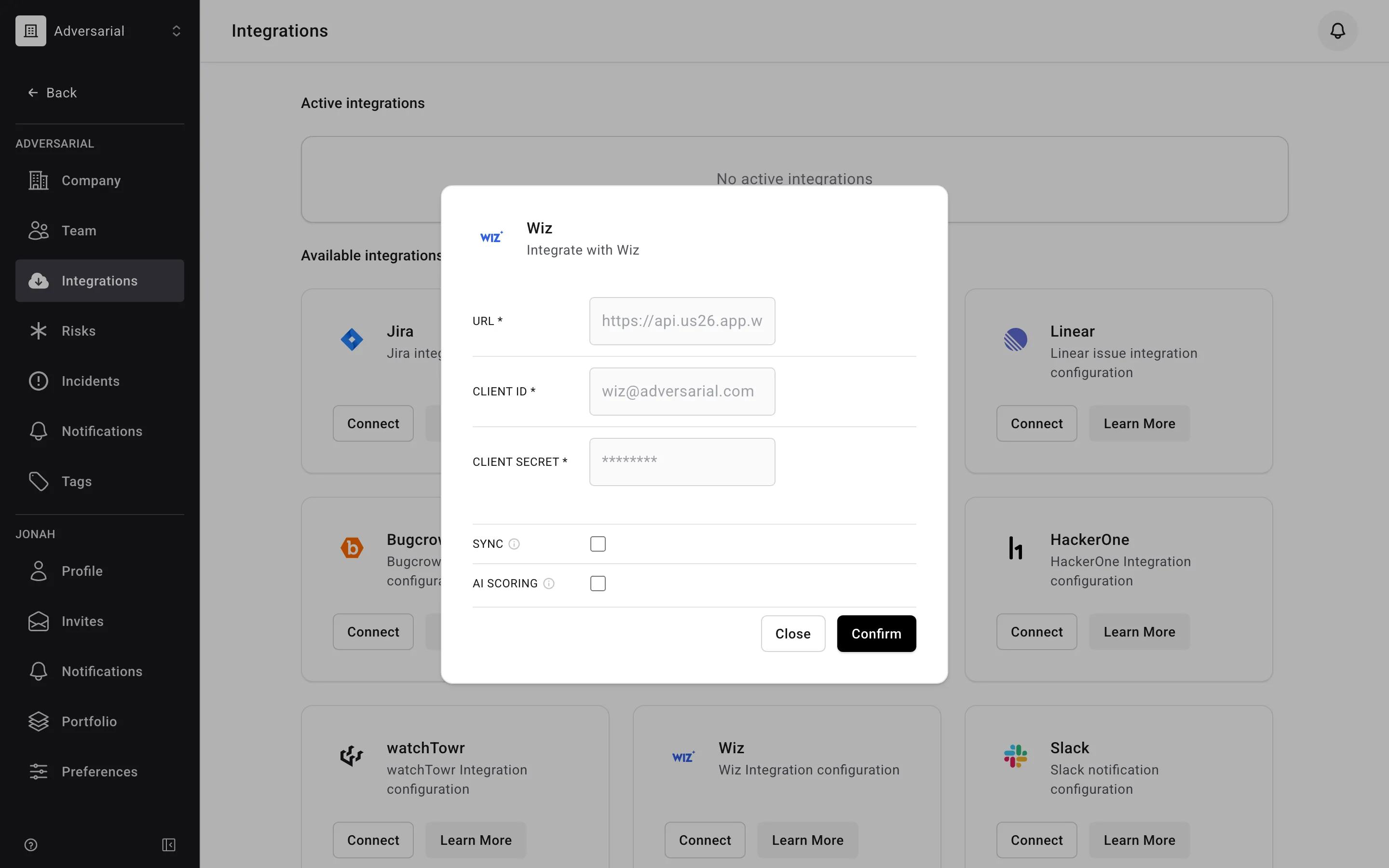
Required Wiz service account permissions
The Wiz service account needs the following read scopes. These cover both the issues/findings the integration imports as risks and the inventory data used to enrich them.
Detected Issues/Risks (13 scopes, to read Wiz detections/alerts)
read:issuesread:vulnerabilitiesread:detectionsread:data_findingsread:iac_findingsread:threat_issuesread:attack_surfaceread:posture_issuesread:excessive_access_findingsread:software_supply_chain_findingread:ai_security_findingsread:access_findingsread:sast_findings
Inventories (19 scopes, to read Wiz’s inventories/current configuration visibility)
read:api_endpointsread:application_servicesread:cloud_accountsread:cloud_configurationread:endpoint_attack_surfacesread:host_configurationread:inventoryread:kubernetes_clustersread:network_connectionsread:network_exposureread:registriesread:repositoriesread:repository_contentsread:resourcesread:sbom_artifactsread:secret_instancesread:security_frameworksread:threatsread:user_accounts
Status Mapping
Section titled “Status Mapping”Wiz issue status is mapped to an Adversarial risk status using both the status and the resolution reason:
| Wiz Status | Resolution Reason | Adversarial Status | Notes |
|---|---|---|---|
| Open | — | New | |
| In Progress | — | Remediation | |
| Resolved | (any) | Closed | Closed Date carried over |
| Rejected | Exception | Remediation | Time-bound exception |
| Rejected | (any other) | Closed |
If Wiz reports a status or severity Adversarial doesn’t recognize, the issue imports with status New and IRU Info.
Severity Mapping
Section titled “Severity Mapping”Wiz severity maps directly to Adversarial Initially Reported Urgency (IRU). Only Cloud Configuration and Toxic Combination issue types are imported — Threat Detection issues are excluded. Informational severity issues are excluded.
| Wiz Severity | Adversarial IRU |
|---|---|
| Critical | Critical |
| High | High |
| Medium | Medium |
| Low | Low |
Fields
Section titled “Fields”| Wiz Field | Adversarial Field | Notes |
|---|---|---|
source_rules[0].name |
Title | Falls back to “Wiz Issue {id}” |
| (multiple fields) | Description | Assembled from the Wiz issue description, projects, resource details, technologies running on the resource, public network exposures, Wiz’s exploitability validation, tags, resolution context, service tickets, notes, and Wiz console links |
severity |
IRU | Via severity mapping above |
created_at |
Discovered Date | Uses reopened_at for reopened issues (see below) |
resolved_at |
Closed Date | For Resolved and non-Exception Rejected issues |
due_at |
Expected Date | For Open and In Progress issues |
rejection_expired_at |
Expected Date | For Rejected issues with an expiring exception |
assignee.primaryEmail |
Assigned To | Matched to an organization member by email; see Assigned To |
| (static) | Source | Always “Attack Surface Monitoring” |
| (static) | Type | Always “Configuration” |
Assigned To
Section titled “Assigned To”When a Wiz issue is assigned to someone, Adversarial matches that person to a member of your organization by email address. If an active member has the same email, they are set in the Assigned To field on the imported risk. If no member matches — or the issue is unassigned — the risk is imported unassigned.
On later syncs, Adversarial fills in the assignee only when the risk doesn’t already have one. It never changes an assignee you’ve set in Adversarial, so reassigning a risk on the platform sticks even when the Wiz assignee is different.
Reopened issues
Section titled “Reopened issues”When a previously closed Wiz issue is reopened, the Discovered Date is reset to the reopen timestamp (reopened_at from Wiz) instead of the original created date. This prevents the time the issue spent closed from inflating time-to-remediate on the Remediation Agility chart.
The following Wiz open reasons are treated as reopens:
- Issue Resurfaced — a resolved issue has reappeared
- Reopened by User — a user manually reopened the issue
- Rejection Expired — a rejection/exception expired, reopening the issue
All other open reasons (e.g. first seen, resource created) continue to use the original created date.