Notifications
Overview
Section titled “Overview”When users take actions in the platform — creating risks or incidents, updating fields, leaving comments — the system records events behind the scenes. A background process runs on a regular interval, collects pending events, and converts them into notifications for the relevant subscribers.
Notification Types
Section titled “Notification Types”New items
Section titled “New items”Subscribers are notified when an item first reaches a severity or urgency they follow, or is assigned a threat objective they follow — whether that happens when the item is created, or later when an existing risk or incident is scored or re-tagged.
| Category | Notification Types |
|---|---|
| Risk by urgency | New Low Risk, New Medium Risk, New High Risk, New Critical Risk |
| Incident by severity | New Severity 1 Incident, New Severity 2 Incident, New Severity 3 Incident |
| Incident by threat objective | New Fraud Incident, New Extortion Incident, New Sabotage Incident, New Data Disclosure Incident, New Customer Targeting Incident, New Resource Hijacking Incident |
| Batch creation | Risks Created, Incidents Created |
Assignments and direct notifications
Section titled “Assignments and direct notifications”| Notification Type | Trigger |
|---|---|
| Assigned Risk | You are assigned to a risk |
| Assigned Incident | You are assigned to an incident |
| Mentioned | Someone @-mentions you in a comment on a risk or incident |
| Invited to Organization | You are invited to join an organization |
Changes and comments
Section titled “Changes and comments”| Notification Type | Trigger |
|---|---|
| Risk Changed | A risk you follow is updated, including new comments |
| Incident Changed | An incident you follow is updated, including new comments |
Mentions have their own delivery rules — see User Mentions.
User-Level Notifications
Section titled “User-Level Notifications”User-level notification preferences are configured per user in Settings > Notifications.
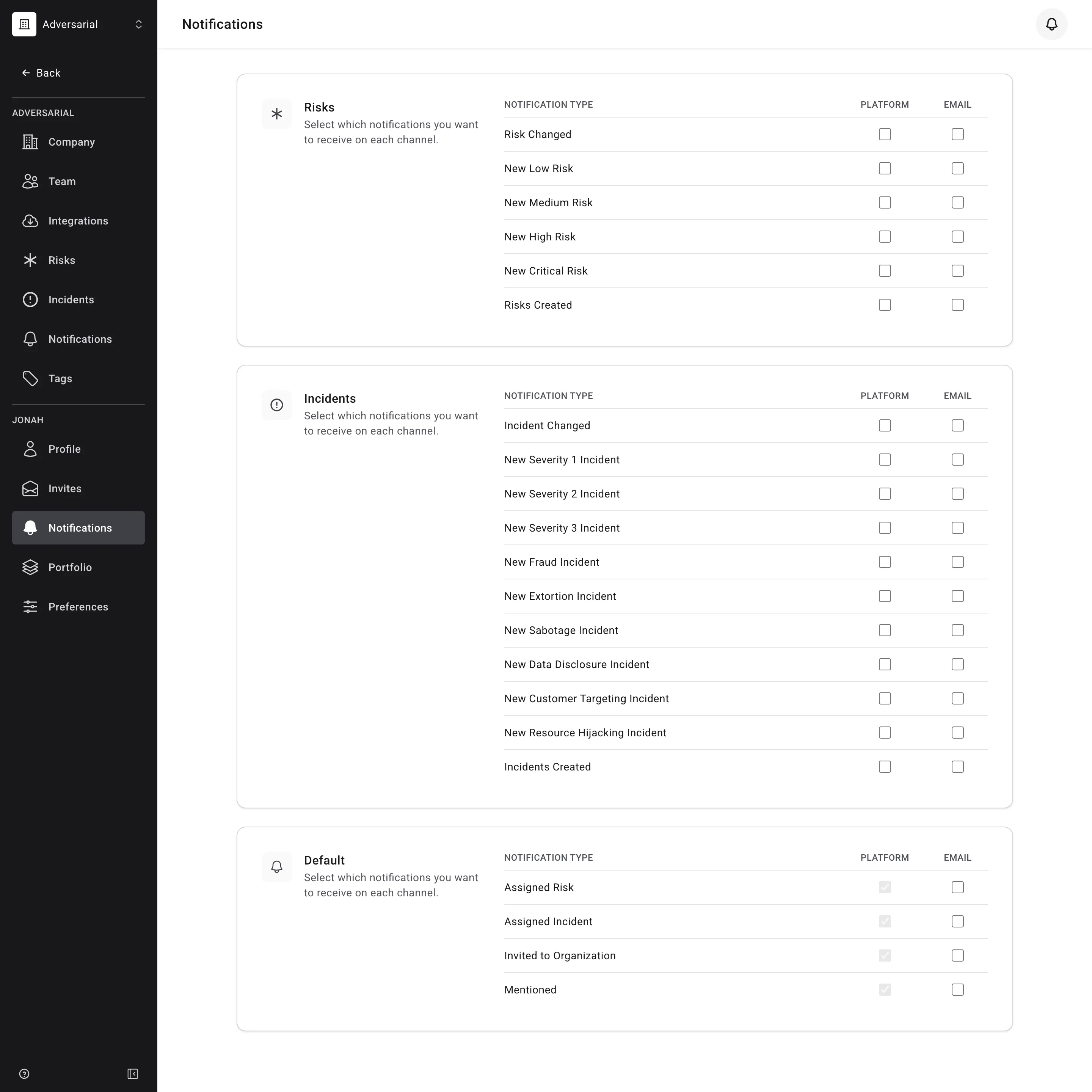
- For each notification type, choose whether to receive it via Platform (in-app notification center), Email, or both.
- Org-wide types — subscribe once and get notified about all matching items. For example, subscribing to “New Severity 1 Incident” delivers a notification every time an incident reaches SEV-1 in your organization.
- Item-specific types — you must be following a specific risk or incident to receive change and comment notifications for it.
- You start following an item when you follow it explicitly, when you are assigned to it, or when an incident is tagged with a threat objective you subscribe to. Commenting on an item, or being mentioned in one, does not start following it.
- If no preferences are set, notifications default to in-platform delivery.
Org-level notifications deliver to shared Slack or Teams channels and are configured by admins. See Org-Level Notifications for setup instructions.