Cloudflare
Overview
Section titled “Overview”Integrate your Risk Register and Incident Register with Cloudflare. A risk integration imports Security Center insights, Zero Trust CASB findings, and Page Shield malicious scripts as risks. An incident integration imports WAF attack campaigns and Brand Protection matches as incidents. Both use the same kind of connection, so one connection can serve both. You can also use separate connections, for example with API tokens scoped to different permissions.
| Cloudflare Source | Register | Adversarial Source | Class |
|---|---|---|---|
| Security Center insights | Risks | Attack Surface Monitoring | Configuration |
| CASB findings | Risks | Third-party Review | Third-party |
| Page Shield malicious scripts | Risks | Attack Surface Monitoring | Vulnerability |
| WAF | Incidents | Web Application Firewall (WAF) | — |
| Brand Protection | Incidents | Managed Detection and Response (MDR) | — |
- Opened By: The integration’s integration user, which has the same name as the integration.
API Token Permissions
Section titled “API Token Permissions”Create a Cloudflare API token (a user token or an account token) with Read access for each source you plan to import:
| Source | Token Permissions |
|---|---|
| Security Center insights | Account › Account Security Center Insights › Read |
| CASB findings | Account › Zero Trust › Read |
| Page Shield | Zone › Zone › Read and Zone › Client-side security › Read |
| WAF | Zone › Zone › Read and Zone › Analytics › Read |
| Brand Protection | Account › Cloudforce One › Read |
You also need your Cloudflare Account ID, the 32-character ID shown on the account’s overview page in the Cloudflare dashboard.
Adding the Integration
Section titled “Adding the Integration”- In Adversarial, go to Settings > Integrations and select Add.
- Select RSK in the Cloudflare row to import risks, or INC to import incidents.
- Enter an Instance Name, such as
Cloudflare Risks. - Open Connection and select Add a connection…. Enter a Connection Name and the Account ID, paste the API token into Api key, then select Save Connection.
- Under Sources, tick the sources to import. None are ticked by default, and the integration can’t be enabled until at least one is.
- Risks: Security insights, CASB, and Page Shield.
- Incidents: WAF and Brand Protection. When WAF is ticked, two more settings appear:
- Minimum requests (default 10) — how many requests one source must send, blocked or not, before it is imported as an incident. It also needs at least one security event.
- Lookback hours (default 24, at most 720) — how many hours of activity each incident describes. Cloudflare limits the analytics window by plan: 24 hours on Free and Pro, 72 on Business, and 720 on Enterprise. Set it no higher than your plan allows.
- Select Save.
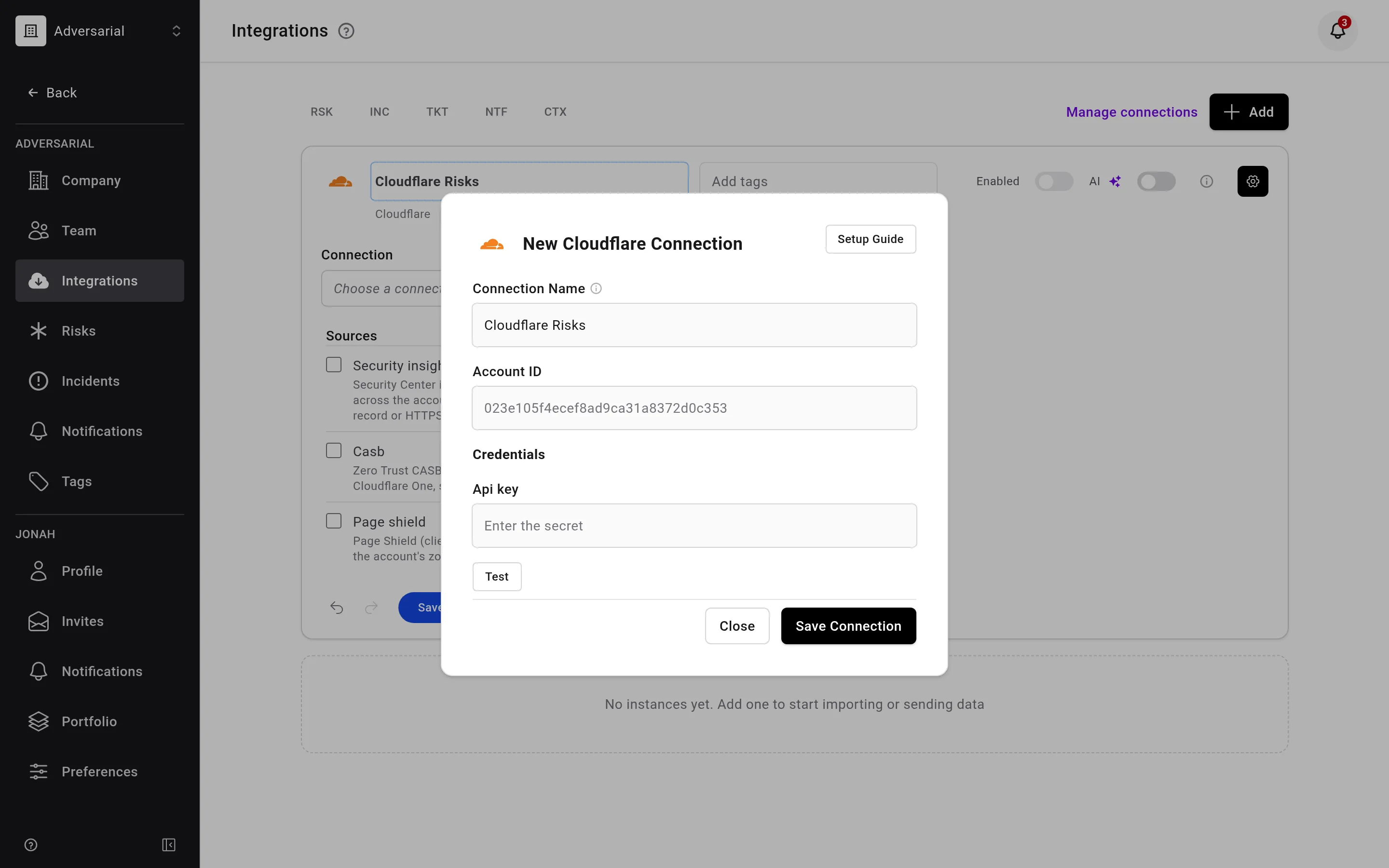
To import both risks and incidents, add a second integration from the other column. Choose the same connection, or add a separate connection with its own API token if you want to scope each token’s permissions to the products it imports.
Testing
Section titled “Testing”Test on the connection checks that the API token is valid and active, and that the Account ID is 32 hexadecimal characters. It does not check that the token can reach that account, so a user token can pass with the wrong Account ID.
Test on an integration previews the first records each ticked source returns. If the token is missing a source’s permission, the preview names the permission it needs.
Each sync reads the full list from Cloudflare. Adversarial creates one risk per:
- Security Center insight, including archived insights, which import as Closed.
- CASB finding per connected SaaS integration in Cloudflare One. Only posture findings are imported; DLP content findings are not.
- Page Shield script per zone, for scripts Cloudflare flags as malicious only.
Status Mapping
Section titled “Status Mapping”| Cloudflare State | Adversarial Status |
|---|---|
| Security insight open | New |
| Security insight archived or resolved | Closed |
| CASB finding open, with active instances | New |
| CASB finding ignored, or with no active instances left | Closed |
| Page Shield malicious script | New |
Severity Mapping
Section titled “Severity Mapping”Cloudflare severity maps to Adversarial Initially Reported Urgency (IRU):
| Source | Cloudflare Severity | Adversarial IRU |
|---|---|---|
| Security insights | Critical | Critical |
| Security insights | Moderate | Medium |
| Security insights | Low | Low |
| CASB | Critical, High, Medium, Low | Same level |
| Page Shield | URL or domain reported malicious by threat intelligence | Critical |
| Page Shield | Flagged as malicious by Cloudflare’s script classifier | High |
For CASB, a severity an administrator has overridden in Cloudflare is used in place of the original. Page Shield scripts are imported only when they are flagged by threat intelligence or score 10 or lower (on Cloudflare’s 1–99 scale) for JavaScript integrity, malware, cryptomining, or Magecart. Cloudflare reports these signals only on zones whose plan includes them, so other zones import no scripts.
Fields
Section titled “Fields”| Adversarial Field | Security Insights | CASB | Page Shield |
|---|---|---|---|
| Title | Insight class and subject, such as “Always use https not enabled (example.com)” | “{finding} — {integration}”, such as “Slack File Publicly Accessible — Corp Slack” | “Malicious script on {zone}: {script host}” |
| Description | Link to the insight in Security Center; class, type, severity, subject, zone, and detection method; Cloudflare’s remediation text | Link to the finding’s active instances in Cloudflare One; finding description; vendor, integration, category, severity, active and archived instance counts; a table of up to 100 active instances with each asset, its type, and when it was detected, and a count of any not listed; threat, impact, and compliance frameworks | Link to Cloudflare; script URL, host, zone, first and last seen; threat signals and scores; up to 10 pages that load the script |
| Remediation Task | Cloudflare’s remediation text | Cloudflare’s remediation guide | Fixed text: confirm the script is expected on the listed pages, and remove it or block it with a content security rule if not |
| Discovered Date | When Cloudflare first detected the insight | The earliest detection date among the finding’s instances, including hidden ones; the import date if it has none | When Cloudflare first saw the script |
| Closed Date | The insight’s last scan, once closed | The finding’s latest occurrence, once closed | Not set |
| IRU | Via severity mapping above | Via severity mapping above | Via severity mapping above |
| Source | Always “Attack Surface Monitoring” | Always “Third-party Review” | Always “Attack Surface Monitoring” |
| Class | Always “Configuration” | Always “Third-party” | Always “Vulnerability” |
Title, Description, Remediation Task, IRU, Source, and Class are updated from Cloudflare on every sync, so edits to them in Adversarial are overwritten. The Discovered Date is also refreshed from Cloudflare on each sync. Cloudflare provides no assignee, likelihood, or impact.
When the AI switch is on, new risks are scored on import. A later sync does not rescore them, even when a CASB finding’s instance counts change its description.
Incidents
Section titled “Incidents”Severity for both incident sources is set by Adversarial from what Cloudflare reports, not by AI scoring, so the AI switch has no effect on Cloudflare incidents.
Brand Protection
Section titled “Brand Protection”Brand Protection imports matches from the string and logo queries saved in your Cloudflare dashboard. With no saved queries, nothing is imported, and the integration’s Test says so. Logo queries require a Cloudflare Enterprise plan.
- One incident per lookalike domain, however many string queries matched it, titled “Lookalike domain: {domain}”.
- One incident per logo match, titled “Logo impersonation: {domain}”.
| Match | Adversarial Severity | Adversarial Status |
|---|---|---|
| Logo match (a page serving your logo) | SEV-3 | New |
| Lookalike domain | SEV-4 | New; Closed once the domain is dismissed on every query that matched it |
When a match is no longer listed, for example because its saved query was deleted, the nightly full sync closes its incident and adds a comment. A dismissal doesn’t close an incident whose status a person set last. The severity reasoning explains the match kind: a logo match means the impersonation is live, while a lookalike domain may not be in use yet.
| Cloudflare Field | Adversarial Field | Notes |
|---|---|---|
| Domain | Title | See title formats above |
| (multiple fields) | Description | Link to Brand Protection; domain; whether a string or logo query found it, and the query’s tags; registrar; first seen; scan status; logo similarity; URL Scanner report link |
| First seen (match time for logos) | Detected Date | Import time when Cloudflare has no date |
| First seen | Occurred Date | |
| (static) | Source | Always “Managed Detection and Response (MDR)” |
On later syncs, the title, description, and dates (when Cloudflare has them) are refreshed. Severity is set on import only, so a severity you change in Adversarial stays. Status changes only when Cloudflare dismisses a domain, which closes it, unless a person set the status last.
The WAF source groups each attacker’s activity across every active zone into one incident per source address: one per IPv4 address, or one per IPv6 /64. A source is imported once, within Lookback hours, it has at least one security event and at least Minimum requests in total, counting allowed traffic. Allowed, skipped, bypassed, and rewritten requests, and solved challenges, are not security events. Counts are Cloudflare’s sampled estimates.
Severity and Status
Section titled “Severity and Status”Each incident’s title states what the WAF analytics show, with the address and its top country:
| Title | Adversarial Severity | Status on Import | When |
|---|---|---|---|
| WAF blocked 203.0.113.7 (US) | SEV-4 | Closed | No request got a response that needs review |
| WAF blocked 203.0.113.7 (US), some requests succeeded | SEV-4 | Review | Some requests got a response that needs review, as listed below |
| False positive: WAF blocked 203.0.113.7 (US) | SEV-5 | Review | Requests got 2xx on paths that returned 401 or 403 to other clients, or 2xx writes, and no request matched a WAF attack rule. This can be a real user |
A response needs review when the source got any of these:
- 2xx on paths that returned 401 or 403 to other clients.
- 2xx on POST, PUT, PATCH, or DELETE requests.
- 2xx on paths named like sensitive files, such as version-control metadata, environment files, or backups.
- 2xx on requests that a WAF attack rule in log mode matched.
- An average 2xx response over 100 KB on a restricted path, from a source that also matched WAF attack rules.
- 5xx responses from the origin to at least 50 of its requests, and to at least 10% of them.
Severity comes from Cloudflare’s request and response analytics, never from scoring. It is never higher than SEV-4, because the analytics don’t show intent or impact. Raise it yourself once you confirm impact. The severity reasoning lists the facts that set the severity, and for SEV-4 it ends “Request and response analytics do not show impact.”
Each new incident gets a comment that starts “Closed:” or “In Review:” and says why, with a line on the source’s recent activity. Threat objectives that fit the matched WAF rules, such as Data Disclosure, Fraud, or Sabotage, are linked to a new incident at Moderate relevance. A later sync doesn’t link threat objectives, so a link you remove stays removed.
Fields
Section titled “Fields”| Adversarial Field | Notes |
|---|---|
| Title | As in the table above |
| Description | The source’s requests across the account’s zones within Lookback hours; the actor (addresses, networks, countries, user agents, claimed bots, zones); the WAF rule matches; the traffic that got through, by destination; and, for a false positive, the rules and paths it matched with recent Ray IDs. When a source’s traffic reaches Cloudflare’s analytics row limit, the description says that some requests may be missing |
| Detected Date | When the incident was first imported |
| Contained Date | Same as Detected Date when the WAF blocked the source and the incident is Closed. Not set for an incident in Review |
| Severity | As in the table above |
| Source | Always “Web Application Firewall (WAF)” |
Occurred and Responded dates are not set.
Re-sync
Section titled “Re-sync”| Incident State | What a Sync Does |
|---|---|
| Open | Refreshes the title and description. Severity only rises. An incident still in New moves to Closed or Review, with a comment that starts “Closed:” or “Moved to Review:”. When it moves to Closed, an empty Contained Date is set to the Detected Date. |
| Closed, source quiet since the last sync | Nothing |
| Closed, source back and needing review | Reopens to Review, with a comment that starts “Reopened to Review:”, if the severity rose or a person did not close it. The reopen clears the Contained Date, unless a person set it. |
| Closed, otherwise | Adds a comment that starts “Active again:”, at most once a day. If the source needs review but a person closed the incident, the comment says “A person closed this incident, so it stays closed.” |