

Risk Fields
Status
Section titled “Status”The Status field tracks where a risk is in its lifecycle.
- New — A new risk has been created in the risk register, either manually, via API integration, or in bulk via CSV. The New status indicates a risk that requires attention and investigation to determine urgency and any needed remediation. Triage should be prioritized using the Initially Reported Urgency field so that entries with the highest reported urgency are handled first. During this phase, ensure that all relevant details are populated, most notably the Title and Description fields. These fields enable assessment of the true urgency by assigning Likelihood and Impact. For users leveraging AI Suggest Scoring, these fields, together with RAMP, are used to propose a score. Based on the assigned urgency, assign appropriate remediation tasks.
- Urgency Proposed — Risks scored using the AI Suggest Scoring feature move to Urgency Proposed. Users can also set their risks to this status manually via the status dropdown.
- Remediation — The risk has been confirmed as a true risk to the organization. Remediation efforts can begin, with specific parties assigned and aware of the actions they need to take.
- Closure Proposed — This optional status can be used when remediation requires validation. It is also useful for teams with multiple validators and approvers. For customers with the ticketing integration enabled, Closure Proposed indicates that remediation teams report the risk as resolved via the ticketing platform.
- Closed — The risk review cycle and remediation efforts are complete. This status can be used if a fix was implemented, verified, and the risk is now resolved.
The Title field provides a concise summary of the risk. It is a key input for AI Suggest Scoring and appears as a table output of the CyberGov deck, serving as a quick reference to the record details.
Description
Section titled “Description”The Description field captures detailed information regarding the risk — mainly the output of initial investigation and reconnaissance. It may include details outlining the affected assets, exposure, and impact of a risk, functioning as the first line of details that need to be communicated to those reviewing the risk. Used along with the RAMP as an embedding in the AI Suggest Score feature, the Description field plays a vital role in determining the Urgency score. A short snippet of the description appears as a table output of the CyberGov deck.
Urgency
Section titled “Urgency”The Urgency field is derived from the combination of Likelihood and Impact. The assigned urgency directly determines the SLA and therefore the Due Date of the risk.
| Urgency | SLA | Due Date |
|---|---|---|
| Critical | 30 days | Discovered Date + 30 days |
| High | 60 days | Discovered Date + 60 days |
| Medium | 180 days | Discovered Date + 180 days |
| Low | 365 days | Discovered Date + 365 days |
| Info | None | Not set |
- Critical — Immediate action is required to mitigate severe consequences or prevent irreparable damage.
- High — Prompt action is required. Delays may lead to significant consequences.
- Medium — Timely action is recommended. Delays can increase the likelihood and impact.
- Low — Attention may be needed in the future, but the situation is not currently urgent. Monitoring or minor adjustments may suffice.
- Info — Informational only; no immediate action is necessary. The situation is within the organization’s risk appetite and poses no significant concern. Some users may refer to this as “Risk Acceptance.”
Likelihood
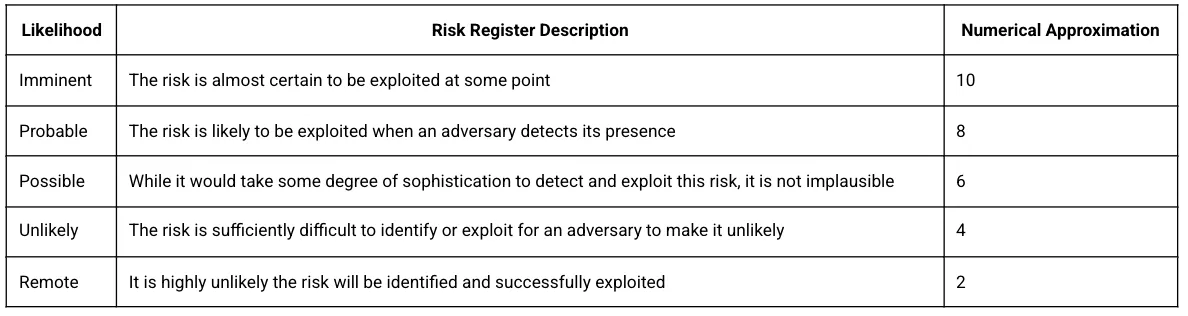
Section titled “Likelihood”This field refers to the likelihood that the specified risk can be exploited or otherwise cause an adversarial threat objective to come to fruition.
Impact
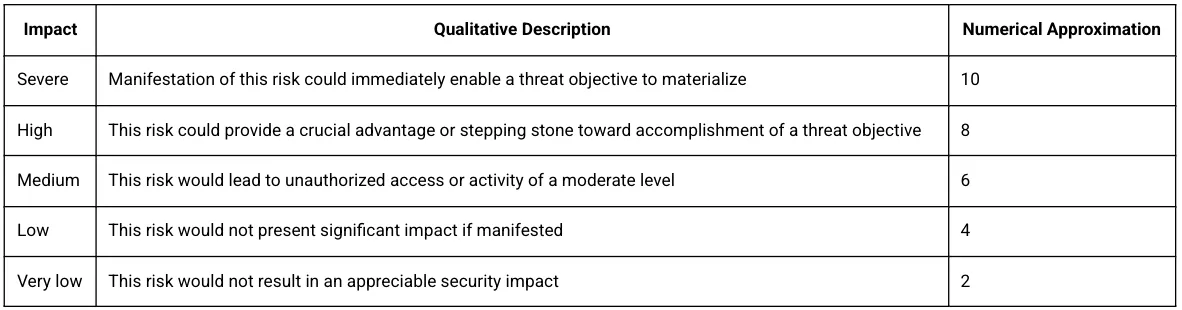
Section titled “Impact”Impact should be designated based on the capability of a risk — if exploited — to manifest into an adversarial threat objective, policy violation, or other unauthorized activity. The category of a risk, where appropriate, should be used as a starting point before adding contextual information such as the target system environment, connectivity, purpose, value, and criticality.
Initially Reported Urgency
Section titled “Initially Reported Urgency”The Initially Reported Urgency (IRU) field captures the raw score reported by the reporting source. In the case of a vulnerability scanner, this may be the CVSS score. In the case of a penetration test or other third-party review, this will be the risk rating reported by the third party. When thinking about RSKs from an inherent versus residual risk point of view, the IRU field can be regarded as your inherent risk. IRU allows us to prioritize risks to determine their true urgency scoring.
Source
Section titled “Source”The Source field identifies where a risk originates. Examples include employee-reported issues, findings from Red Team exercises, or outputs from security tools. This field is designed to be tool-agnostic.
Two items to consider:
- While the Source field is editable to capture additional values, we recommend using the predefined options and supplementing them with Tags to add more detail as needed. If you add custom source values and upload new risks using the Risk Template, the dropdown values will not automatically display in the template.
- Source value = Adversarial: Any risk originating from the Adversarial team is tagged with “Adversarial.” This tag is especially important for AKRs and items derived from threat intelligence curated within the platform.
The Type field categorizes the nature of the risk. There are seven values.
Risks arising from flaws or weaknesses in custom application code or scripts written by your organization.
Examples: Insecure authentication/authorization logic, improper input validation (e.g., SQLi risk), hardcoded secrets, insecure cryptography usage, business logic errors.
Typical sources: Code reviews, SAST/DAST, pen tests, bug bounty.
Configuration
Section titled “Configuration”Risks caused by misconfigured systems, services, cloud/IAM settings, networks, or applications — often due to insecure defaults or drift from baselines.
Examples: Publicly exposed storage buckets, permissive security groups/firewall rules, disabled TLS/weak ciphers, default credentials enabled, overly broad IAM roles.
Typical sources: CSPM/IaC scans, configuration audits, hardening checks.
Control Deficiency
Section titled “Control Deficiency”Missing, incomplete, or ineffective security controls relative to policy, standards, or frameworks — at design or operating effectiveness level.
Examples: No MFA for privileged access, inadequate logging/monitoring, absent EDR, unreliable backups, incomplete vendor risk management, no data loss prevention.
Typical sources: Risk assessments, internal/external audits, compliance reviews.
Procedural
Section titled “Procedural”Gaps or weaknesses in processes or human workflows that create risk, even when technology is correctly configured. Excludes policy design/coverage issues (see Policy).
Examples: Inconsistent access reviews, weak change management, incomplete incident response runbooks, flawed onboarding/offboarding, insufficient security training.
Typical sources: Process walkthroughs, tabletop exercises, RCA, and operational reviews.
Vulnerability
Section titled “Vulnerability”Known security defects in third-party software, operating systems, libraries, or firmware (often CVE-referenced) that require patching or mitigation.
Examples: Unpatched OS/app CVEs, vulnerable open-source dependencies, device firmware flaws.
Typical sources: Vulnerability scanners, SBOM/dependency tools, vendor advisories.
Third Party
Section titled “Third Party”Risks originating from external suppliers, vendors, cloud/SaaS providers, contractors, managed services, or other external dependencies.
Examples: Vendor lacks sufficient assurance (e.g., SOC 2/ISO not available or scoped inadequately), material supplier security incident, subprocessor changes without reassessment, weak incident notification/SLA terms, inadequate data processing agreement, concentration risk with a single critical provider.
Typical sources: Vendor risk assessments (VRM), questionnaires (SIG/CAIQ), contract/DPA reviews, SOC/ISO reports, supplier incident notices.
Policy
Section titled “Policy”Risks due to missing, outdated, unclear, conflicting, or noncompliant policies or standards that govern security expectations.
Examples: No formal access control policy, policy conflicts between subsidiaries, policies not reviewed/approved annually, data classification policy absent, encryption standard missing minimum algorithm/key requirements.
Typical sources: Policy reviews, governance/compliance gap analyses, audit of policy lifecycle.
Quick Tips for Choosing a Type
Section titled “Quick Tips for Choosing a Type”- Custom code issue —> Code
- Known flaw in third-party components —> Vulnerability
- Setting is wrong (but the product is fine) —> Configuration
- Required safeguard missing or ineffective —> Control Deficiency
- Issue stems from process/procedure execution —> Procedural (not Policy)
- Risk from vendor/supplier —> Third Party (not Vulnerability or Configuration)
- Adequacy of written policies/standards —> Policy
Threat Objectives
Section titled “Threat Objectives”The Threat Objectives (TO) field links an identified risk to specific adversary objectives. Assigning Threat Objectives is strongly recommended, as it is critical for assessing residual risk.
The assignment of a threat objective can be done at two levels of correlation, driven by the shading of each threat objective. Clicking on the relevant TO once indicates a low correlation (light gray). Clicking on the same TO a second time indicates a strong correlation (darker color).
For RSKs: The goal of the TO is to help measure how the organization is performing against the prioritized Threat Objectives in the Threat Profile.
For AKRs: The urgency applied to a Threat Objective is determined by how strongly the AKR correlates with your established Threat Profile. For AKRs, threat objectives are already assigned. A stronger correlation drives higher urgency, while a weaker correlation lowers it. Change flows in both directions: adjusting the values of Threat Objectives via the Threat Profile will update how those Threat Objectives are associated with AKRs. Conversely, the degree of correlation between an AKR and a Threat Objective will influence the urgency that results from any Threat Profile changes.
Threat Objectives are automatically assigned when using AI Suggest Score. The AI identifies relevant threat objectives based on the risk details and assigns them with appropriate correlation levels.
Item tags allow users to assign pertinent labels and leverage filter views to modularize their register views. Available in both the Risk and Incident Registers, item tags are created at the organization tenant level and can be shared across users.
To create and assign a tag: Go to the Tags column. Click into the box to view existing tags or start typing to create a new tag, then press Enter.
Bulk Edit supports the following operations:
- No Change — No modifications
- Add New — All selected records get the new tag while keeping existing tags
- Replace All — All existing tags replaced by the new value
- Find & Remove — Specific tags removed without modifying others
- Remove All — Complete removal of all tags
To filter by tags: Click the filter icon, select the Tags field, and save as a view.
To manage tags: Navigate to the Tags section within Settings for editing, deleting, or creating tags.
- Discovered Date — Date the risk was identified. Auto-populated with the creation date but editable. Important for the Remediation Agility Chart.
- Due Date — Assigned based on Discovered Date + Urgency SLA. Important for the Remediation Agility Chart.
- Expected Date — Optional. For risks with remediation planned beyond the SLA window.
- Closed Date — Date the risk was remediated and closed. Important for the Remediation Agility Chart.
- Created Date — System field, not editable.
- Updated Date — System field, not editable.
Responsible Parties
Section titled “Responsible Parties”- Opened By — Name of the user who created the risk.
- Assigned To — User responsible for activities related to the risk.
Remediation Task
Section titled “Remediation Task”Describes specific actions required to address a risk. The audience is the broader organization; this field is typically authored by the security team. Be specific and action-oriented. If a Jira ticket is assigned, include a concise summary of the planned remediation.
Control Statement
Section titled “Control Statement”Documents the controls in place that address the risk. Populate as the final step before moving the risk to Closed. A control statement can include: what the control is and how it works, scope of coverage, how the control is monitored or enforced, and where evidence can be found.
Comments
Section titled “Comments”Functions as an additional field for capturing historical context, collaboration details, and AI reasoning. With the Description field playing a vital role in capturing initial investigation details, the Comments section can include updates uncovered during the ongoing lifecycle.