

Scoring and Response
AI Suggest Score
Section titled “AI Suggest Score”Similar to scoring risks with the AI Risk Scoring feature, the AI Incident Scoring feature embeds the CIRP (found in the compliance module), a supplementary guide, and details found in the incident entry to allow for appropriate scoring and memorializing the reasoning within the incident record.
For Incident Register entries, the AI scoring feature takes into account the details captured in the Title, Description, and Threat Objectives fields. These fields then get bundled with the CIRP and the CIRP AI Embedding Supplement.
In addition to proposing severity, the AI Suggest Score feature automatically assigns Threat Objectives as part of its output. The AI identifies which threat objectives are associated with the incident and assigns them with appropriate correlation levels. Severity reasoning is also persisted in the incident record’s Comments field, providing a permanent audit trail of the AI’s scoring rationale.
Incident Chart
Section titled “Incident Chart”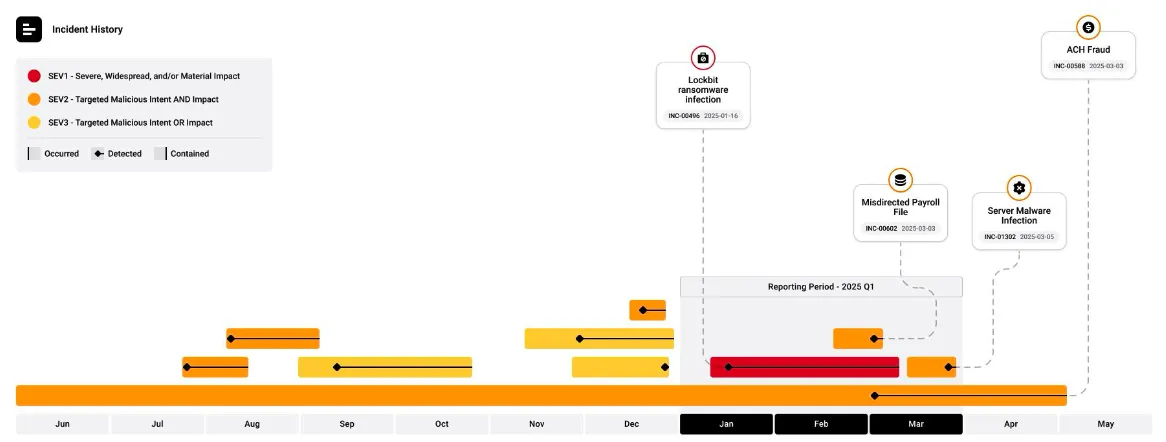
The Incident Chart shows a 365-day view of incident reporting and how effectively incidents are being contained. The chart focuses on incidents rated SEV1, SEV2, and SEV3, showing when threats manifested, when they occurred, when they were detected, and when they were contained.
The chart is driven by four fields:
- Severity
- Occurred Date
- Detected Date
- Contained Date
Filtering
Section titled “Filtering”The Incident Chart can be filtered to show specific severity levels. Use the filtering options to select the severity level to focus on.
Governance Reporting
Section titled “Governance Reporting”The chart is included as the primary incident slide in the Board Deck and the CyberGov Report, exported as editable PPTX files. A reporting-period callout highlights incidents marked SEV1, SEV2, and SEV3 for the current cycle, while the full-year view shows consistent incident identification and containment.
Chart Callouts
Section titled “Chart Callouts”Within the chart, callouts display for incidents in the identified reporting period. Information in callout bubbles includes:
- Threat Objective
- Title
- INC ID
- Detected Date
The red, orange, and yellow color around the threat objective aligns with the assigned severity level.